Technology
Microsoft Learn: Free courses to get started and certifications to advance in technology
Microsoft Learn brings together free courses, practical tracks, and credentials for those who are starting out or already working with technology. See how to take advantage of the platform.
By Ederson Andrade · September 24, 2026 · 11 min read
Audio
Listen to this article
13 minutes, approximately
Getting into tech can seem harder than it actually is. There are many languages, platforms, job titles, and acronyms, and those who are just starting out are often given huge lists of subjects without knowing which one to study first. Microsoft Learn helps turn this confusion into smaller, organized paths.
Microsoft's educational platform brings together thousands of hours of online training, study materials, exercises, knowledge tests and, in many contents, interactive labs. Much of the self-guided learning catalog is free and can be accessed in the browser itself. The student chooses the subject and advances at his own pace, even if he only has 15 minutes available that day.
This guide was divided into two audiences. The first part is for those who are taking their first steps and are still looking for direction. The second is for professionals who already work with technology and want to validate skills through certifications and practical credentials.
For those who are just starting out: knowledge is power
Knowledge is power because it increases your ability to make choices. When you understand the fundamentals of programming, cloud, data, or security, you stop relying solely on other people's opinions to decide which path suits your interests.
This doesn't mean trying to learn everything at once. The best start is to pick a small goal, study the basics, and practice before moving forward. O Microsoft Learn It was built precisely for this kind of gradual progress.
You don't need to be enrolled in college, work at Microsoft, or have professional experience to access the training. The official documentation says there are thousands of hours of free, self-guided content, including text, videos, knowledge checks, and hands-on activities. Some instructor-led training and certification exams can be paid, but studying the modules online doesn't require you to purchase an exam.
In the official video below, Microsoft presents the main features gathered in Microsoft Learn. The recording is from 2022, so some visual elements of the platform have already changed, but the demo remains useful to understand how training, documentation, and career resources are concentrated in the same environment.
How the platform organizes learning
The catalog uses some names that can be confusing on first access:
- Unit: a short part of a lesson, with text, video, exercise, or knowledge test.
- Module: a self-contained and usually short course, often completed in less than an hour.
- Learning Path: a sequence of modules organized to develop a broader skill.
- Plan: a set of content with goals, steps and optional reminders to help the student maintain the routine.
- Documentation: Technical reference material used to get started with a product, solve problems, or understand its architecture.
The official diagram helps to visualize the hierarchy: each script brings together related modules, and each module is divided into smaller units. Therefore, completing an isolated unit is not equivalent to finishing an entire course.
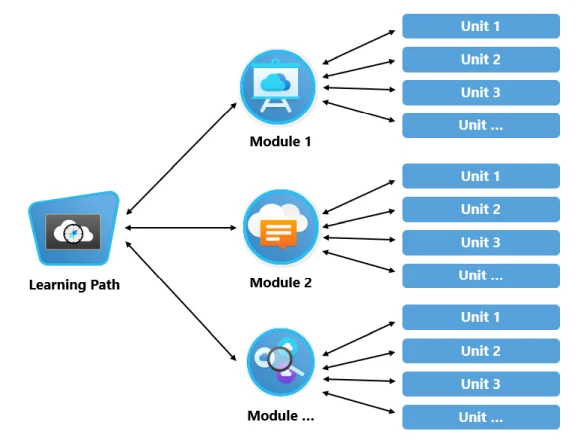
Image Source: Microsoft Learn—content types and resources.
For a beginner, the learning path is often the best gateway. It reduces the chance of studying content out of order. A stand-alone module is most useful when you already know exactly what task you need to learn.
A simple way to get started
- Create a profile with a personal Microsoft account. You can read a lot of materials without signing in, but your profile records your progress, achievements, and credentials. Microsoft recommends starting with a personal account so you don't lose your history when you change jobs or educational institutions.
- Choose an area, not a random tool. Think about the type of problem you'd like to solve: developing programs, securing systems, working with data, administering cloud services, or automating business tasks.
- Use the "Beginner" and "Learning path" filters. The catalog allows you to filter by level, product, professional function, and subject.
- Study in short, frequent blocks. Thirty minutes on four days a week tends to produce more results than trying to complete several hours of content in one sitting.
- Do the exercises. Reading creates familiarity; performing a task reveals whether you have truly understood the subject.
- Build something small. After a script, turn the learning into a program, report, automation, or lab that can be explained to someone else.
Which trail to choose first?
| Your interest | A good starting point |
|---|---|
| I still don't know how computers and the internet work | Computing Fundamentals Roadmap |
| I want to program | C# Fundamentals and Early Console Programs |
| I want to understand cloud services | Cloud concepts and Azure fundamentals |
| I like data and reports | Introduction to data analytics and Power BI |
| I'm interested in security | Cybersecurity, identity, and compliance concepts |
| I want to understand AI used at work | Generative AI, Copilot, and Agent Fundamentals |
| I want to create solutions without coding too much | Power Platform, Power Apps, and process automation |
These paths are not lifelong contracts. Their function is to allow you to experiment with an area with structured material. If the subject does not arouse interest, choose another one. Discovering what you do not want to do is also part of training.
Create a routine that you can stick to
A practical strategy is to set a four-week goal. Pick just one roadmap, set two or three fixed times a week, and record what you've learned in your own words. When you're done, produce a simple piece of evidence: a GitHub repository, a demo, a Power BI report, or a text explaining the project.
Microsoft Learn experience points and badges help you visualize progress, but shouldn't be confused with a professional certification. An achievement shows that a module has been completed. A credential requires a specific assessment to validate a larger set of competencies.
Also don't expect to feel like you know everything before practicing. Technology changes continuously, and even experienced professionals consult documentation every day. The initial goal is to develop enough vocabulary, reasoning, and autonomy to continue learning.
For those who already work with technology: turn experience into a credential
For professionals, Microsoft Learn works differently. Instead of exploring subjects just out of curiosity, it is possible to start from a role held at work and find a credential aligned with the real responsibilities of the position.
Microsoft offers two main formats: Microsoft Certifications e Microsoft Applied Skills. Both generate verified and shareable credentials, but evaluate different breadths.
| Credential | What validates | How it is obtained | When it makes the most sense |
|---|---|---|---|
| Microsoft Certification | A comprehensive set of skills associated with a role or area | Passing one or more proctored exams | To demonstrate broad preparation for a role, promotion, or career change |
| Microsoft Applied Skills | A specific skill applied to a real-world scenario | Tasks in an interactive lab-based assessment | To quickly prove practical competence or fill a technical gap |
A cloud administrator certification, for example, can assess identities, governance, storage, virtual machines, networking, and monitoring. An Applied Skills credential focuses on a more delimited task and asks the candidate to work in a lab environment.
The official image below shows a simple example of the path of a role-based certification: the candidate takes the required exam and, if passed, earns the corresponding credential. Other certifications may have different requirements, so the current page for each credential should be checked before scheduling.
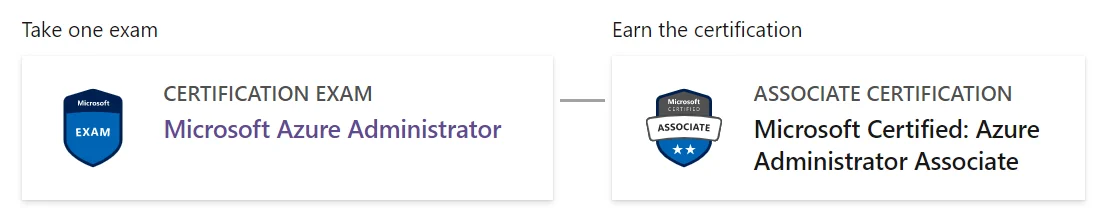
Image Source: Microsoft Learn—content types and resources.
The two options can be combined. A person can earn smaller credentials while preparing for a more comprehensive certification. The catalog itself shows relationships between Applied Skills and role-based certifications.
Don't choose the race by the most famous name
Before selecting a certification, answer three questions:
- What task do I already perform or want to perform professionally?
- Does the job or promotion I want really ask for this technology?
- Do I have enough hands-on experience to understand the scenarios charged?
The current catalog allows you to search for credentials by role, product, level, and subject. Among the available paths are Azure administration, data analysis, security, development, DevOps, Power Platform, and new functions related to artificial intelligence.
In 2026, for example, Microsoft maintains the Azure Administrator Associate, focused on identity administration, governance, storage, compute, networking, and monitoring. For business professionals who use AI without developing applications, there is the AI Business Professional. The AI catalog also now includes options such as Azure AI Apps and Agents Developer Associate, AI Agent Builder Associate, Cloud and AI Security Engineer Associate e Machine Learning Operations Engineer Associate.
The names are examples from the catalog queried in September 2026, not a permanent list. Microsoft updates, replaces, and retires exams as its products and professional roles change.
Attention to retired certifications
This care is especially important for those who find old videos or study plans on social media. Popular AI and development certifications were retired in 2026, including exams AI-900, AI-102 e AZ-204. Old pages, playlists, and search engines can continue to display these names even after they close.
Before purchasing a course or scheduling a test, consult three official pages:
- the current credential page;
- the exam study guide;
- the list of retired or scheduled retirement tests and laboratories.
If an evaluation is discontinued, those who have already earned the credential keep the record in their history, but new candidates can no longer take that test after the indicated date.
How to prepare without studying blindly
Effective preparation starts on the official certification page, not in a random practice test. Use this sequence:
- Read the candidate's profile. It informs the expected experience before the test.
- Open the study guide. Check out the areas evaluated and the approximate weight of each one.
- Complete the related official itineraries. They organize theory, but they do not replace practical experience.
- Perform the tasks in a real environment or laboratory. Learn to recognize mistakes, limits, and consequences of settings.
- Take the free hands-on assessment when it's available. Use the report to find gaps, without memorizing questions.
- Get to know the exam sandbox. It shows the interface and question types before the test day.
- Schedule only when you can explain each goal in the guide. The price varies depending on the country or region in which the exam is performed.
Microsoft recommends using a personal account to register exams. According to the company itself, exams registered only with a corporate or academic account may become inaccessible if the candidate leaves the organization. Work or study accounts can be linked to the personal profile when necessary.
Certifications need to be renewed
Associate, Expert, and Expert-level certifications are typically valid for one year. Renewal is done through a free online assessment on Microsoft Learn and is available for six months prior to expiration. If the certification expires, the professional must re-meet the current requirements and exams.
Fundamentals credentials do not require renewal. This does not mean that the content studied will remain current forever; it just means that the credential does not expire. As services change, continuing to follow modules and documentation is still required.
A certificate helps, but it doesn't work alone
A credential can make it easier to prove knowledge, organize a study plan, and help recruiters identify a specialty. It is not a substitute for experience, communication, problem-solving skills, or a well-explained portfolio.
The strongest use of Microsoft Learn combines three elements:
- Structured learning, to understand the concepts;
- Practice, to demonstrate that you can accomplish the task;
- Credential, to offer verifiable validation when it makes sense for your career.
For those just starting out, the platform lowers the financial barrier and offers direction. For those already working in the field, it can reveal gaps, update knowledge, and turn experience into professional evidence. In both cases, the real value isn't in accumulating badges: it's in using what you've learned to solve better problems.
Where to start
- Microsoft Learn training page
- Catalog of routes and modules
- Career Paths
- Microsoft credentials
- Updated Credential Catalog
- Microsoft Applied Skills
Sources consulted
- Microsoft Learn content types and resources
- Microsoft Learn profile management
- Microsoft Credentials overview
- Microsoft Applied Skills
- Microsoft Certified: Azure Administrator Associate
- Microsoft Certified: AI Business Professional
- Frequently asked questions about renewal
- Retired exams and assessments